ArubaOS-CX Static VXLAN Configuration (Part 1)
Hello there,
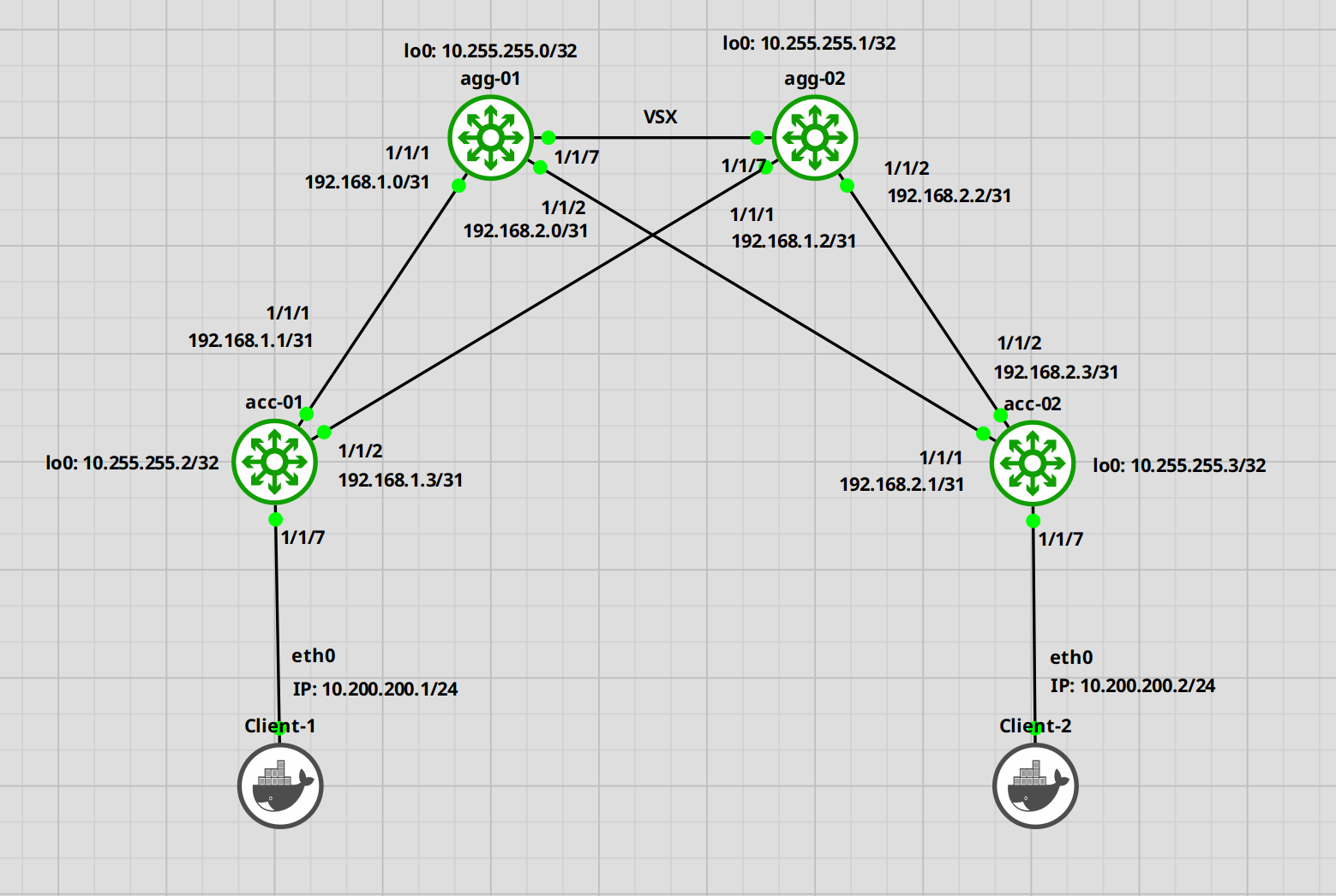
Today, I want to set up a simple VXLAN configuration between 2 access switches connected to a VSX cluster. The cluster will be already configured. If you want to know how to set up VSX, check this post.
I will most likely create a second post, showing how to set this up utilizing EVPN.
VXLAN is a technology that creates an overlay network that allows us to span a layer 2 over a layer 3 network. Layer 2 packages are encapsulated by the tunnel endpoint (VTEP) and decapsulated at its destination (also a VTEP).
Never had a use case for this, but I wanted to try it out. So here we go.
Here is the topology.
Let's start.
Configuration of the Switches
Aggregation Switches
We will begin with the aggregation switches. We have to set the IP addresses and OSPF routing.
agg-01
agg-01(config)# interface loopback 0agg-01(config-loopback-if)# ip address 10.255.255.0/32agg-01(config-loopback-if)# ip ospf 1 area 0OSPF process does not exist. Do you want to create (y/n)? y OSPF Area is not configured. Do you want to create (y/n)? y agg-01(config-loopback-if)# exitagg-01(config)# interface 1/1/1agg-01(config-if)# ip address 192.168.1.0/31agg-01(config-if)# ip ospf 1 area 0agg-01(config-if)# ip ospf network point-to-pointagg-01(config-if)# no shutdownagg-01(config-if)# interface 1/1/2agg-01(config-if)# ip address 192.168.2.0/31agg-01(config-if)# ip ospf 1 area 0agg-01(config-if)# ip ospf network point-to-pointagg-01(config-if)# no shutdown
That's it for the first switch. Let's do the same for the second.
agg-02
agg-02(config)# interface loopback 0agg-02(config-loopback-if)# ip address 10.255.255.1/32agg-02(config-loopback-if)# ip ospf 1 area 0OSPF process does not exist. Do you want to create (y/n)? y OSPF Area is not configured. Do you want to create (y/n)? y agg-02(config-loopback-if)# interface 1/1/1agg-02(config-if)# ip address 192.168.1.2/31agg-02(config-if)# ip ospf 1 area 0agg-02(config-if)# ip ospf network point-to-pointagg-02(config-if)# no shutdownagg-02(config-if)# interface 1/1/2agg-02(config-if)# ip address 192.168.2.2/31agg-02(config-if)# ip ospf 1 area 0agg-02(config-if)# ip ospf network point-to-pointagg-02(config-if)# no shutdown
Alright. Next are the access switches
Access Switches
The configuration is basically the same.
acc-01
acc-01(config)# interface loopback 0acc-01(config-loopback-if)# ip address 10.255.255.2/32acc-01(config-loopback-if)# ip ospf 1 area 0OSPF process does not exist. Do you want to create (y/n)? y OSPF Area is not configured. Do you want to create (y/n)? y acc-01(config-loopback-if)# interface 1/1/1acc-01(config-if)# ip address 192.168.1.1/31acc-01(config-if)# ip ospf 1 area 0acc-01(config-if)# ip ospf network point-to-pointacc-01(config-if)# no shutdownacc-01(config-if)# interface 1/1/2acc-01(config-if)# ip address 192.168.2.1/31acc-01(config-if)# ip ospf 1 area 0acc-01(config-if)# ip ospf network point-to-pointacc-01(config-if)# no shutdown
Verify if the switches can see each other.
acc-01(config)# do ping 192.168.1.0PING 192.168.1.0 (192.168.1.0) 100(128) bytes of data. 108 bytes from 192.168.1.0: icmp_seq=1 ttl=64 time=8.14 ms 108 bytes from 192.168.1.0: icmp_seq=2 ttl=64 time=14.3 ms acc-01(config)# do ping 192.168.1.2PING 192.168.1.2 (192.168.1.2) 100(128) bytes of data. 108 bytes from 192.168.1.2: icmp_seq=1 ttl=64 time=7.69 ms 108 bytes from 192.168.1.2: icmp_seq=2 ttl=64 time=6.32 ms
Alright. Now let's check OSPF.
acc-01(config)# show ip ospf neighborsVRF : default Process : 1 =================================================== Total Number of Neighbors : 2 Neighbor ID Priority State Nbr Address Interface ------------------------------------------------------------------------- 10.255.255.0 n/a FULL 192.168.1.0 1/1/1 10.255.255.0 n/a FULL 192.168.1.2 1/1/2
Great. Everything seems in order. Let's continue with the configuration.
Next, we will set up VXLAN and the VLAN we want to use.
acc-01(config)# vlan 200acc-01(config-vlan-200)# interface vxlan 1acc-01(config-vxlan-if)# no shutdownacc-01(config-vxlan-if)# source ip 10.255.255.2 # IP of the local loopback interface acc-01(config-vxlan-if)# vni 200acc-01(config-vni-200)# vlan 200acc-01(config-vni-200)# vtep-peer 10.255.255.3 # IP of the second access switch loopback interface
OK. Now for the second switch.
acc-02
acc-02(config)# interface loopback 0acc-02(config-loopback-if)# ip address 10.255.255.3acc-02(config-loopback-if)# ip ospf 1 area 0OSPF process does not exist. Do you want to create (y/n)? y OSPF Area is not configured. Do you want to create (y/n)? y acc-02(config-loopback-if)# interface 1/1/1acc-02(config-if)# ip address 192.168.2.1/31acc-02(config-if)# ip ospf 1 area 0acc-02(config-if)# ip ospf network point-to-pointacc-02(config-if)# no shutdownacc-02(config-if)# interface 1/1/2acc-02(config-if)# ip address 192.168.2.3/31acc-02(config-if)# ip ospf 1 area 0acc-02(config-if)# ip ospf network point-to-pointacc-02(config-if)# no shutdownacc-02(config-if)# vlan 200acc-02(config-vlan-200)# interface vxlan 1acc-02(config-vlan-200)# no shutdownacc-02(config-vxlan-if)# source ip 10.255.255.3 ## IP of the local loopback interface acc-02(config-vxlan-if)# vni 200acc-02(config-vni-200)# vlan 200acc-02(config-vni-200)# vtep-peer 10.255.255.2 # IP of the second access switch loopback interface
OK. That's it. Let's do the same tests.
First, we should verify if the access switches can see each other.
acc-01(config)# do ping 10.255.255.3PING 10.255.255.3 (10.255.255.3) 100(128) bytes of data. 108 bytes from 10.255.255.3: icmp_seq=1 ttl=63 time=15.3 ms 108 bytes from 10.255.255.3: icmp_seq=2 ttl=63 time=13.7 ms
Next, we check the VXLAN interface status.
acc-01(config)# show interface vxlanInterface vxlan1 is up Admin state is up Description: Underlay VRF: default Destination UDP port: 4789 VTEP source IPv4 address: 10.255.255.2 VNI VLAN VTEP Peers Origin ---------- ------ ----------------- -------- 200 200 10.255.255.3 static
Check if the red-marked parts are correct. The interface should be "up". Also, we should see the correct IP addresses for the VTEP peer and source.
Testing the setup
If the setup looks correct, we can continue with the tests.
For this, we will configure 1 interface for our clients on each switch.
acc-01(config)# interface 1/1/7acc-01(config-if)# no shutdownacc-01(config-if)# no routingacc-01(config-if)# vlan access 200acc-02(config)# interface 1/1/7acc-02(config)# no shutdownacc-02(config)# no routingacc-02(config)# vlan access 200
Next, we set up the clients. These are Ubuntu guests, so I will use "ifconfig" to set the IP address.
Client-1# ifconfig eth0 10.200.200.1/24Client-2# ifconfig eth0 10.200.200.2/24
Ok. Now let's try to ping.
Client-1# ping 10.200.200.2PING 10.200.200.2 (10.200.200.2) 56(84) bytes of data. 64 bytes from 10.200.200.2: icmp_seq=1 ttl=64 time=26.1 ms 64 bytes from 10.200.200.2: icmp_seq=2 ttl=64 time=15.1 ms
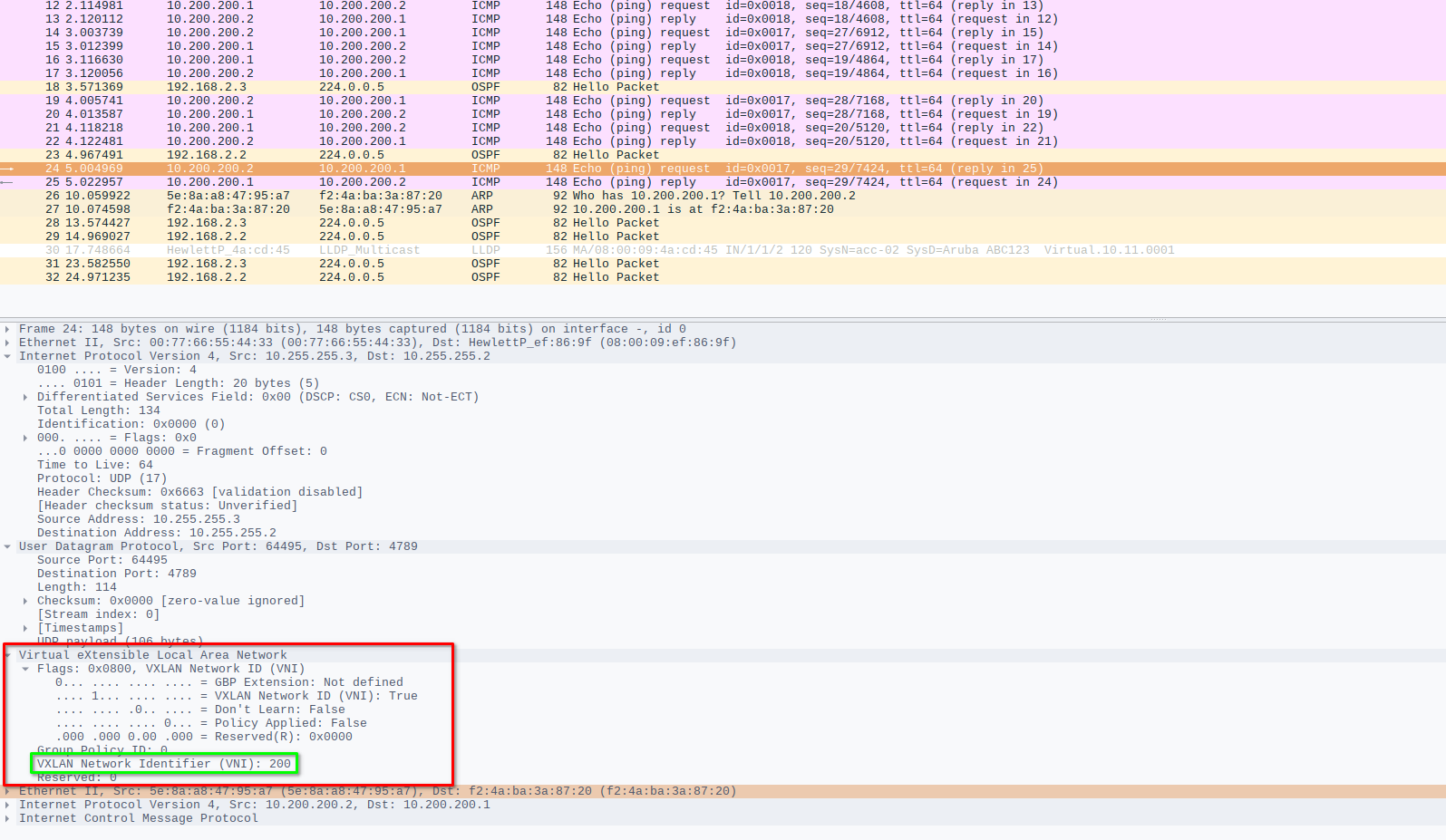
If we check Wireshark, we can see the VXLAN header.
Adding more switches
If you want to add additional switches as VXLAN Endpoints (VTEPs), configure another switch the same way as the access switches with OSPF and all.
In the VXLAN interface configuration you can add more than one "vtep-peer".:
acc-01(config)# interface vxlan 1acc-01(config-vxlan-if)# vni 200acc-01(config-vni-200)# vtep-peer 10.255.255.x
If you want to carry another VLAN, you need to create an additional VNI and map that VLAN to that, since it is always a 1:1 mapping of VLAN to VNI.
acc-01(config)# vlan 300acc-01(config)# interface vxlan 1acc-01(config-vxlan-if)# vni 300acc-01(config-vni-300)# vlan 300acc-01(config-vni-300)# vtep-peer 10.255.255.3acc-02(config)# vlan 300acc-02(config)# interface vxlan 1acc-02(config-vxlan-if)# vni 300acc-02(config-vni-300)# vlan 300acc-02(config-vni-300)# vtep-peer 10.255.255.2
That is it for the VXLAN configuration on ArubaOS-CX switches.
Till next time.